
Best Sportsbook Apps in the UK
Mobile betting and casino access across the UK have shifted toward smartphone apps, and many players prefer to keep accounts on more than one platform at a time. We at Dash Bet understand this, so we put together a rating of casinos that share a similar approach to ours: GBP support, a mix of sports markets and casino games, fast withdrawals, and a working mobile version. The Dash Bet app covers all of these points, and the list below shows which other operators meet the same criteria.














The Dash Bet app loads up to 3 times faster than a regular browser tab, built as a standalone mobile tool with push notifications for live odds and new slot releases. Switching between apps will not wipe the session, so a paused game or incomplete bet slip stays intact. Accumulators work exactly like on desktop, pick up to 20 selections and they stay locked until you place or clear them.
Where to Get the App
We distribute the Dash Bet app download directly from the official website, no third-party marketplaces needed. For Android, We provide an APK file since app stores restrict real-money betting in over 90 countries. iOS users add the mobile version to the home screen via a Safari shortcut. Both paths lead to the same product with identical sportsbook coverage, casino lobby, payment options, and account features.
| Requirement | Details |
| Internet | Wi-Fi or stable mobile data (3G/4G/5G) |
| Free storage | 80–120 MB depending on the OS |
| Android version | 6.0 or later |
| iOS version | 13.0 or later |
| Unknown sources | Enabled once in Settings, then Security on Android only |
| File format | APK for Android, web shortcut for iOS |
Grabbing the Dash Bet app from the official website guarantees the file matches the latest release. UK accounts come with GBP as the default currency from day 1. Whenever We push a fresh version, it installs over the old one in under 30 seconds and keeps all login details intact. Bet history, saved preferences, and any active promotions all stay exactly where they were after the update.
Install DashBet App
The install takes under 2 minutes on any device. Android needs a one-time APK setup, iOS runs through a Safari shortcut. Make sure the phone has at least 120 MB of free storage before starting.
We have written out a walkthrough for each method below. Both were tested on budget phones and older handsets that still hit the OS requirements from the table above, so age of the device is rarely an issue.
Android Setup
Because we host the APK on our official site and not in a store, you will need to tweak one security setting once. On most newer Android models a prompt pops up and points you straight to the right toggle, so there is barely any digging through menus.
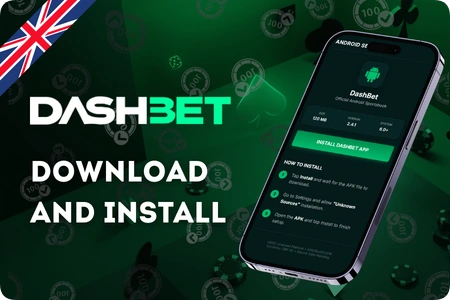
- Open the mobile browser: Fire up whatever browser you normally use and head to the download section on our website.
- Grab the Android file: Tap the download button and wait a few seconds while the APK saves to the device.
- Allow unknown sources: In device Settings, look for Security and flip the toggle that permits APK installs from outside the default store.
- Find the download: Open your file manager, check the Downloads folder or the recent files list, and spot the APK.
- Run the installer: Tap the file, agree to the on-screen prompts, and give it a moment to finish.
- Launch and sign in: Open the Dash Bet app from the home screen and either log into your account or register a fresh one.
Once installed, switch off the unknown sources toggle in Settings to restore the default security level. The new icon lands on the home screen like any other app, with full access to the sportsbook, casino, cashier, and live betting from session 1. The Dashbet app covers bet builders, accumulators, slots, and live dealer tables, while background data keeps odds and match updates coming with the screen locked.
iOS Setup
iPhones and iPads handle things differently: instead of a file, you pin a shortcut to the home screen with its own icon and full-screen mode. Safari hides its toolbar once the shortcut opens, so the interface fills the whole display. We push the latest version automatically on every launch, no manual updates needed. The result feels just like a native app despite being web-based.
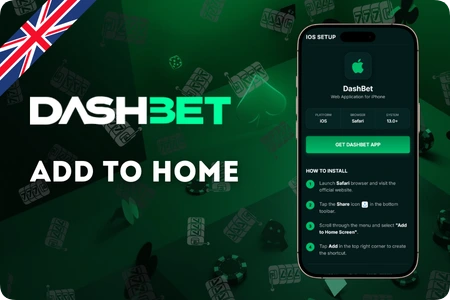
- Open Safari: It has to be Safari, other iOS browsers do not let you pin shortcuts to the home screen.
- Visit the official site: Type our web address into the bar at the top.
- Tap the Share icon: That is the square with an upward arrow sitting at the bottom of the Safari window.
- Pick Add to Home Screen: Scroll the share menu, find this option, and tap it.
- Name the shortcut: Either type something custom or leave the auto-filled label, then hit Add.
- Open and sign in: Tap the fresh Dashbet app icon on the home screen, log in or set up an account.
Android or iOS, the result is the same: full access to the sportsbook, casino lobby, live betting, and account tools. Slots load in under 2 seconds, the bet slip stays put while you browse, and GBP deposits or withdrawals go through without a desktop browser. Cash out on live bets works from the same screen across all 4 supported screen sizes.
Permissions and Preferences
With the Dash Bet app running, We may ask for a few device permissions. We hold an official certificate of operation with reference S/W/Blo/51/2016 and treat all user data according to UK privacy standards. Each of the 4 prompts can be accepted or skipped individually, skipping one turns off only that specific feature while everything else keeps working. We show a short note explaining what each permission does, and none of them affect betting, spinning, or account access.
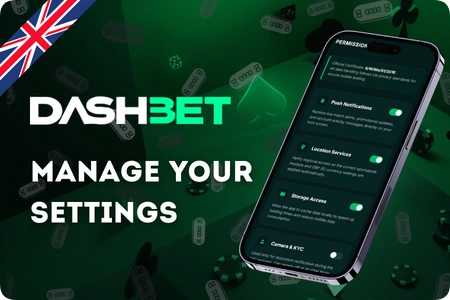
- Push notifications: we send match alerts, casino promo messages, and account updates straight to the lock screen even when the app is closed
- Location services: we check your region so the correct sportsbook markets and GBP currency kick in from the start
- Storage access: lets the Dashbet app store data on the device for faster loading and lower mobile data use during longer casino or betting sessions
- Camera permission: we only request this if KYC document checks come up, safe to leave off the rest of the time
Keeping push notifications on is the 1 setting We recommend, as they flag live odds shifts and account changes in real time. The rest can be flipped on or off any time in phone settings. Android lets you mute promo alerts separately, iOS has the same option inside the notification centre.